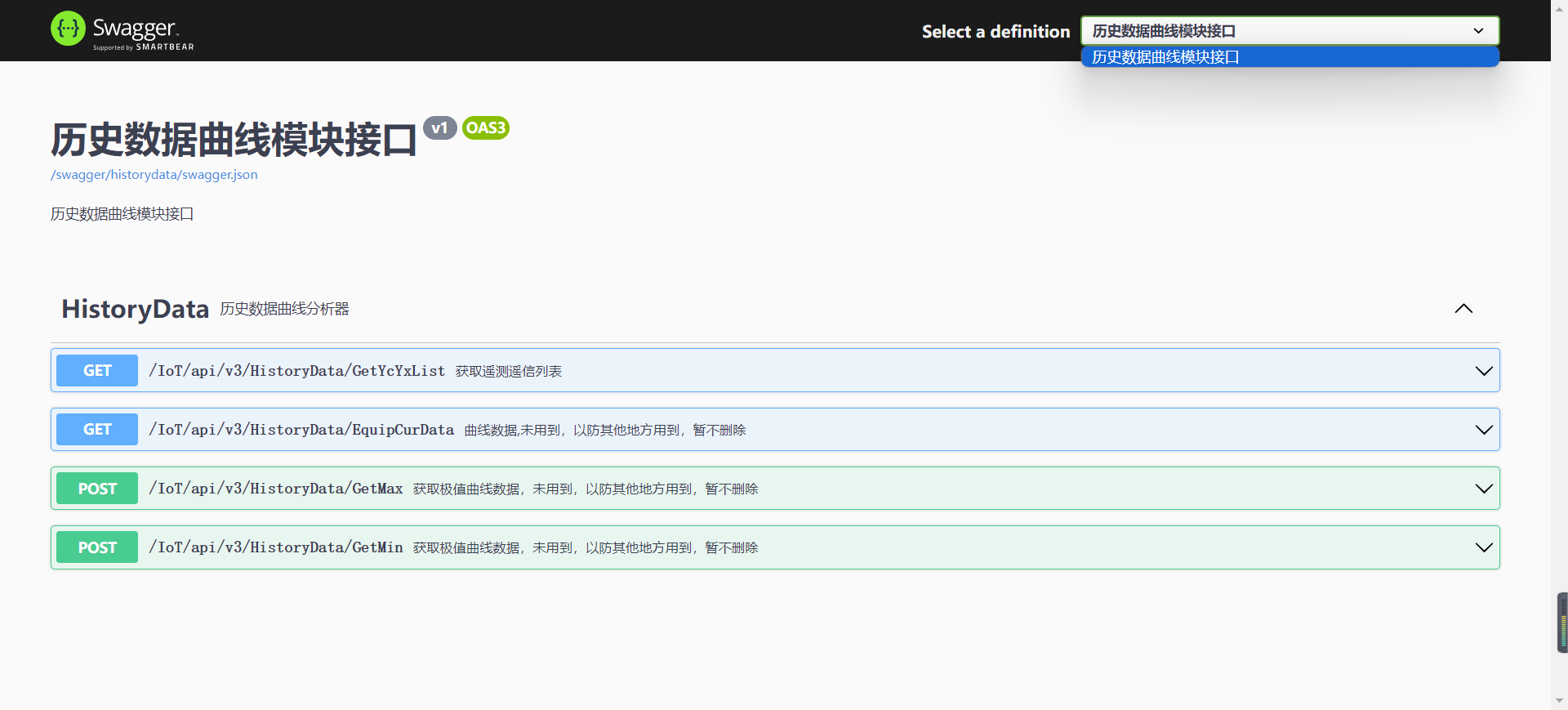
如何使用Swagger
# 1. 背景
在现代软件开发中,API文档的编写和维护是一个重要但繁琐的任务。随着项目规模的扩大和迭代速度的加快,手动维护API文档不仅耗时,而且容易出错,导致文档与实际代码实现脱节。
Swagger作为一种开源的API文档生成工具,极大地简化了这一过程。通过在代码中集成Swagger,开发者可以自动生成与代码同步的API文档,确保文档的实时性和准确性。这不仅提高了开发效率,还使得前后端开发者之间的沟通更加顺畅,减少了因文档不一致而导致的误解和返工。
此外,Swagger还提供了交互式的API测试界面,使得开发者可以直接在浏览器中进行API调用测试,进一步简化了开发和调试流程。因此,系统接入Swagger不仅提升了开发效率,还增强了系统的可维护性和用户体验。
# 2. 准备
现产品基线 webapi 已具备Swagger接入条件,在接口文档呈现有分组和无分组显示,默认分组显示
为了达到分组效果,需要各个插件分组归纳,具体差异如下
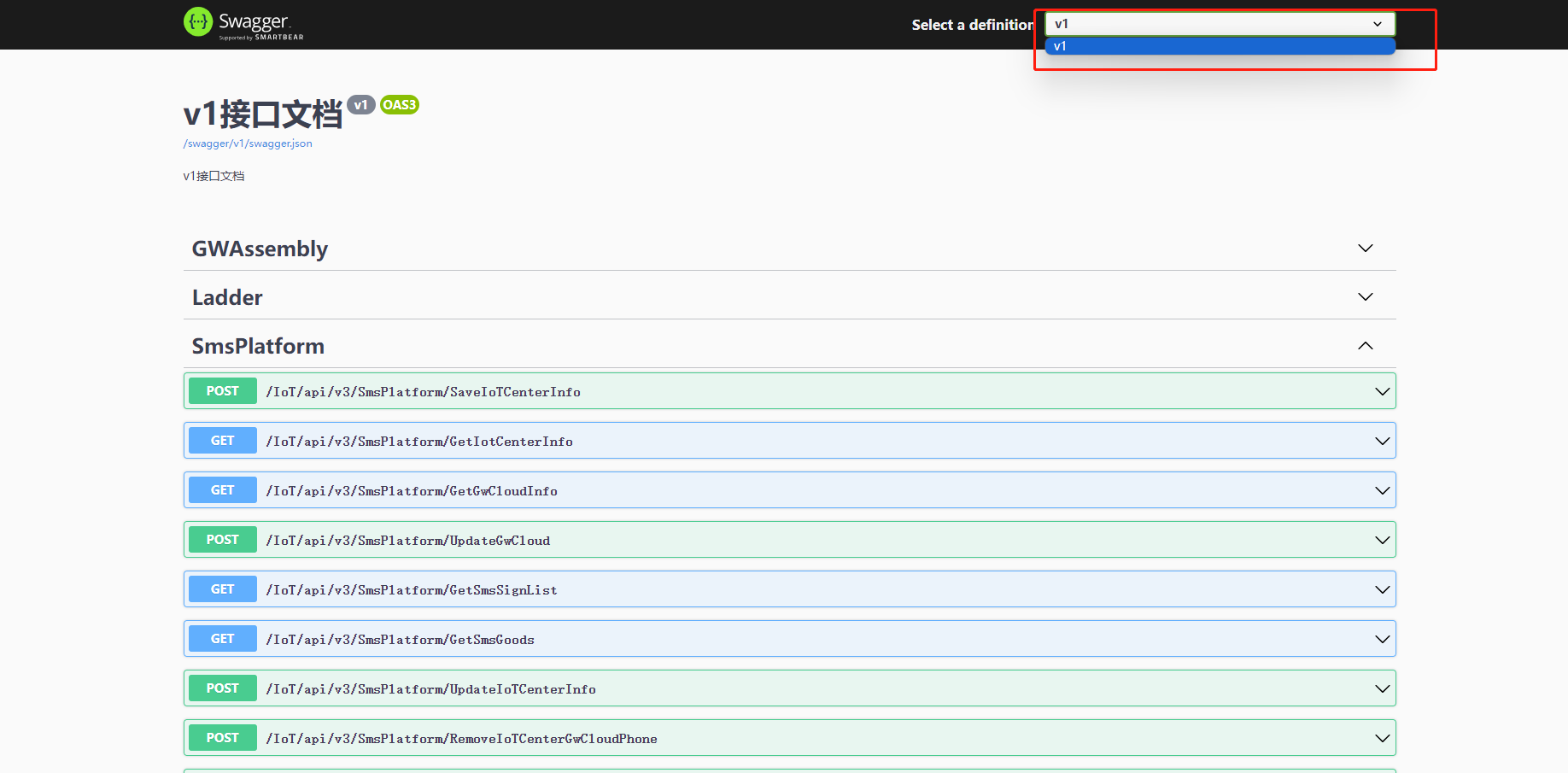
● 不分组效果,所有插件接口在一个json文件中
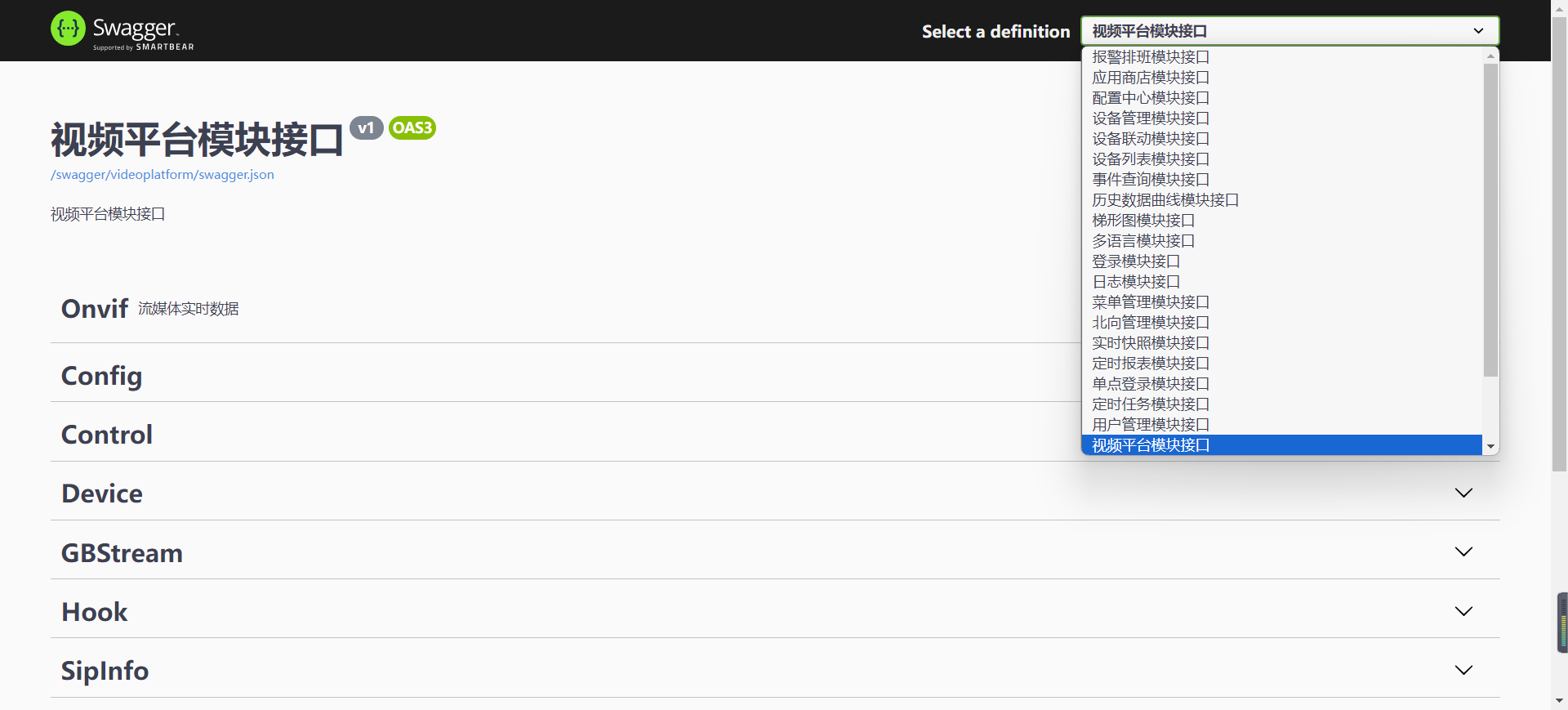
● 分组效果,每个插件有各自的接口json文件
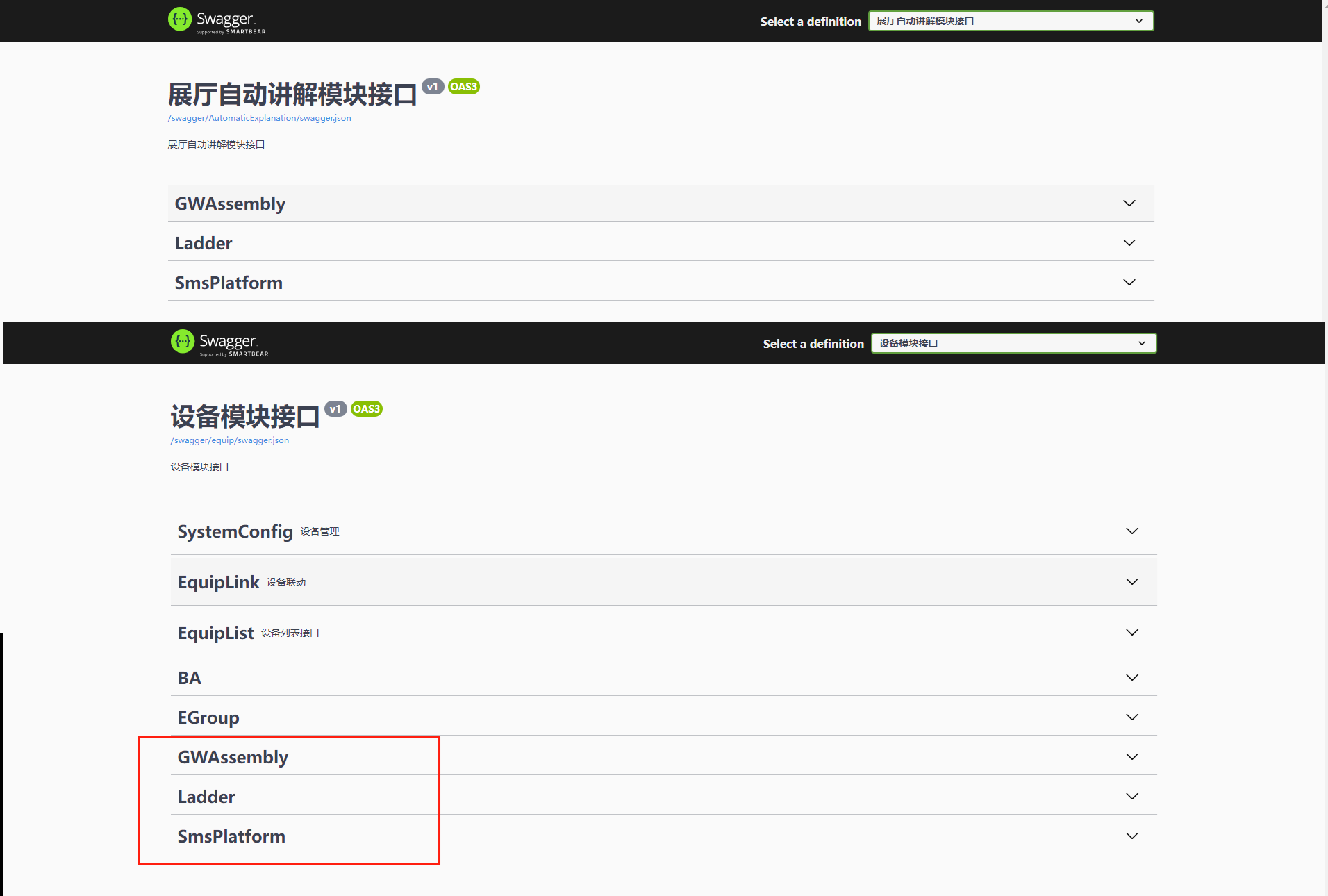
● 如若出现未分组接口,它可能会出现在各个分组中,或者直接不出现
# 3. 接入
# 3.1. 确认运行环境
请确保当前运行环境为 Staging
为何不用 【Development】
因为.net6 在使用环境值为Development时,会做额外的静态文件检查,以确保静态资源的存在性。 而我们的编译输出和发布并不会带上这些静态文件清单,它会提示
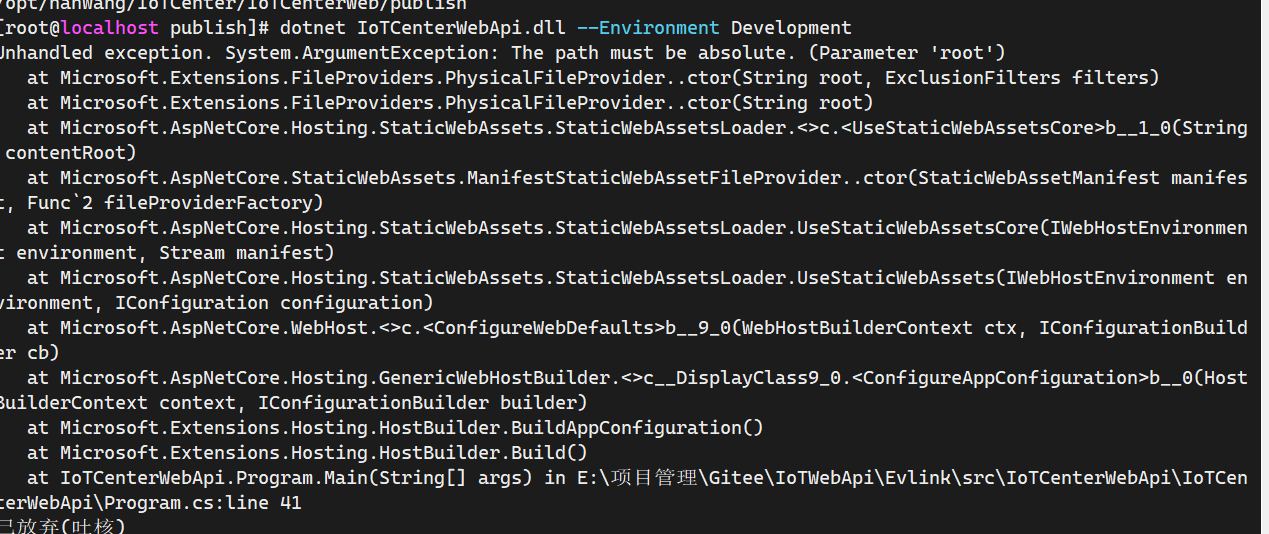
所以,为了不必要的麻烦,我们不使用 Development 值
# 3.1.1. 如何查询当前运行环境值?
# ● Window
○ cmd
echo %ASPNETCORE_ENVIRONMENT%

C:\Users\EDY>echo %ASPNETCORE_ENVIRONMENT%
Staging
○ powershell
echo $Env:ASPNETCORE_ENVIRONMENT

PS C:\Users\EDY> echo $Env:ASPNETCORE_ENVIRONMENT
Staging


Get-Item Env:ASPNETCORE_ENVIRONMENT

PS C:\Users\EDY> Get-Item Env:ASPNETCORE_ENVIRONMENT

Name                           Value
----                           -----
ASPNETCORE_ENVIRONMENT         Staging
也可以在运行时,带上--Development 参数,或者其他配置方式
# ● Linux
# 方法1
echo $ASPNETCORE_ENVIRONMENT

# 方法2
printenv ASPNETCORE_ENVIRONMENT

# 方法3
cat ~/.bashrc | grep ASPNETCORE_ENVIRONMENT
cat ~/.bash_profile | grep ASPNETCORE_ENVIRONMENT

# 方法4
env | grep ASPNETCORE_ENVIRONMENT
# ● Docker
# 方法一:使用 docker exec 命令查看运行中的容器
# 进入容器
docker exec -it xxx-container /bin/sh
echo $ASPNETCORE_ENVIRONMENT

# 方法二:直接查看容器的环境变量
docker inspect --format='{{range .Config.Env}}{{println .}}{{end}}' xxx-container

# 方法三:查看 Dockerfile 或启动命令

# 方法四:如果使用 docker-compose 启动容器,可以查看 docker-compose.yml
# 3.1.2. 如何设置
# ● Windows
方法一:使用“系统属性”窗口更改
1. 右键点击“此电脑”,然后选择 “属性”。
2. 点击 “高级系统设置”(通常位于“系统”面板的左侧)。
3. 在“系统属性”窗口中,点击 “环境变量” 按钮。
4. 在 “用户变量” 或 “系统变量” 区域中查找 ASPNETCORE_ENVIRONMENT 变量。
a. 如果该变量已经存在,选择它并点击 “编辑”,然后输入新的值。
b. 如果该变量不存在,点击 “新建”,输入变量名 ASPNETCORE_ENVIRONMENT 以及所需的值。
5. 点击 “确定”,保存更改。
方法二:使用命令提示符 (Command Prompt)
1. 打开 命令提示符。
2. 输入以下命令来设置 ASPNETCORE_ENVIRONMENT 变量的值:
setx ASPNETCORE_ENVIRONMENT "Staging"
方法三:使用 PowerShell
1. 打开 PowerShell。
2. 使用以下命令设置 ASPNETCORE_ENVIRONMENT 变量的值:
[System.Environment]::SetEnvironmentVariable("ASPNETCORE_ENVIRONMENT", "Staging", "User")
或者,如果你想设置系统范围内的变量:
[System.Environment]::SetEnvironmentVariable("ASPNETCORE_ENVIRONMENT", "Staging", "Machine")
注意: User 表示用户变量,Machine 表示系统变量。
# ● Linux
# 方法一:临时设置(仅当前会话有效)
export ASPNETCORE_ENVIRONMENT=Staging

# 方法二:永久设置(针对当前用户)
# 编辑用户的 shell 配置文件(如 ~/.bashrc、~/.bash_profile 或 ~/.zshrc,取决于你使用的 shell 类型)。
# 在文件末尾添加以下行:
export ASPNETCORE_ENVIRONMENT=Staging
# 保存并退出编辑器
# 使修改生效
source ~/.bashrc
source ~/.bash_profile
source ~/.zshrc

# 方法三:系统范围内永久设置(针对所有用户)
# 打开终端并以管理员身份编辑 /etc/environment 文件。
# 在文件中添加以下行(如果已存在其他变量,请按格式添加):
ASPNETCORE_ENVIRONMENT=Staging
# 保存并退出编辑器。
# 使用 source 命令来加载新的环境变量设置
source /etc/environment
# ● Docker
# 方法一:通过 Dockerfile 设置
FROM mcr.microsoft.com/dotnet/aspnet:6.0
ENV ASPNETCORE_ENVIRONMENT=Staging

# 方法二:通过 docker run 命令设置
docker run -e ASPNETCORE_ENVIRONMENT=Staging xxx-image

# 方法三:使用 docker-compose 设置,可以在 docker-compose.yml 文件中设置环境变量:
version: '3.8'
services:
  my-service:
    image: my-image
    environment:
      - ASPNETCORE_ENVIRONMENT=Staging

# 方法四:通过 docker exec 设置(仅当前会话有效)
docker exec -it xxx-container /bin/sh
export ASPNETCORE_ENVIRONMENT=Staging
# 3.2. 插件分组
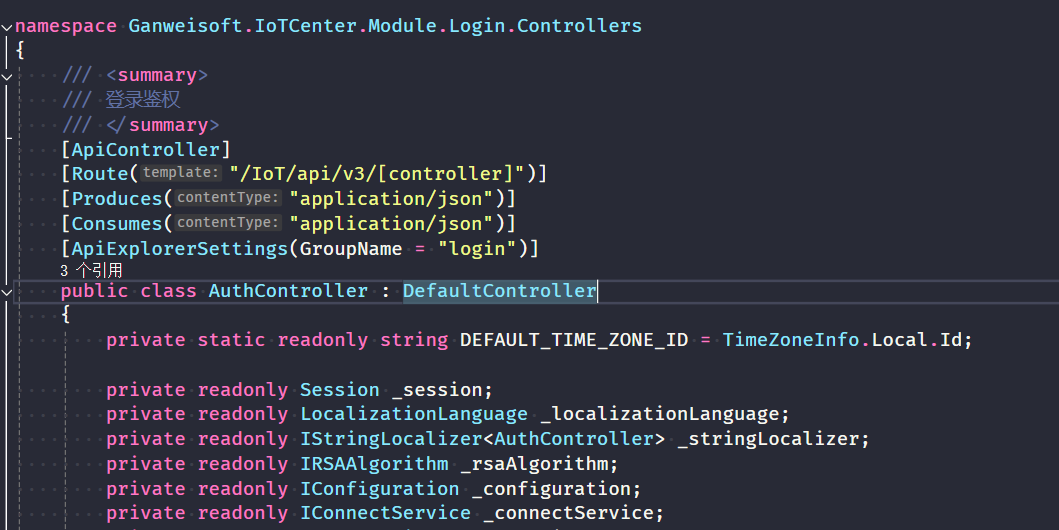
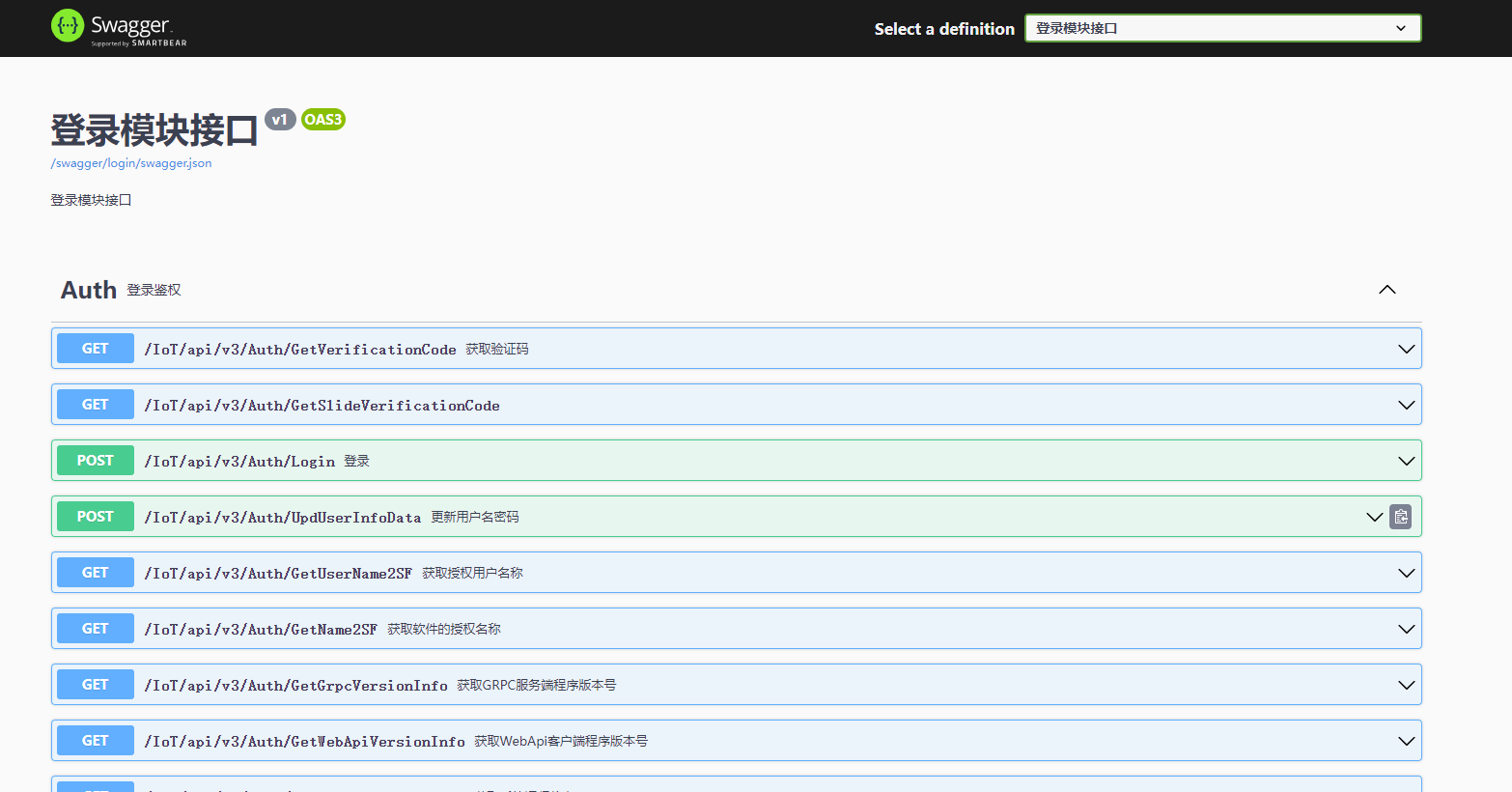
使用 ApiExplorerSettings 属性标识 Controller
[ApiExplorerSettings(GroupName = "login")]
# 3.3. Api分组信息
● 安装Swagger插件
默认一个插件模块一个接口分组
具体配置:详见 4.4 新增扩展
为了有 summary 显示,最好在各个插件开启xml输出 ,在插件项目csproj 文件中添加,如:Ganweisoft.IoTCenter.Module.VideoPlatform.csproj
<Project Sdk="Microsoft.NET.Sdk">
	<PropertyGroup>
        <GenerateDocumentationFile>True</GenerateDocumentationFile>
        <DocumentationFile>Ganweisoft.IoTCenter.Module.VideoPlatform.xml</DocumentationFile>
	</PropertyGroup>
</Project>
# 4. 其他
# 4.1. 注意
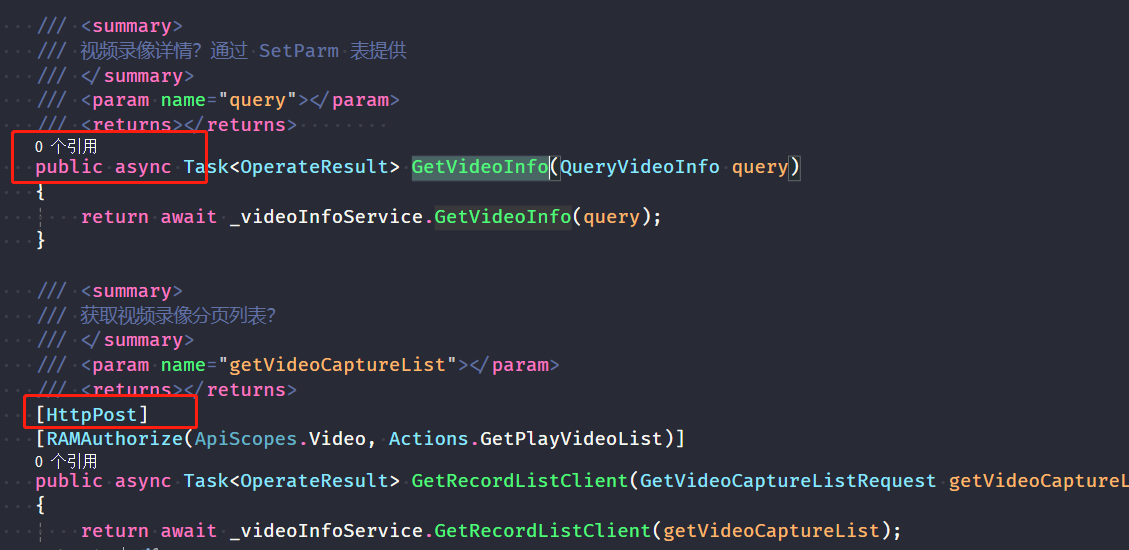
不规范的Api定义,可能让在线接口文档生成失败,详情请查看Error日志

2024-08-16 18:37:38.100 +08:00 [ERR] Connection id "0HN5TRTMP4SAQ", Request id "0HN5TRTMP4SAQ:00000055": An unhandled exception was thrown by the application.
Swashbuckle.AspNetCore.SwaggerGen.SwaggerGeneratorException: Ambiguous HTTP method for action - Ganweisoft.IoTCenter.Module.VideoPlatform.Controllers.ConfigController.Get (Ganweisoft.IoTCenter.Module.VideoPlatform). Actions require an explicit HttpMethod binding for Swagger/OpenAPI 3.0
   at Swashbuckle.AspNetCore.SwaggerGen.SwaggerGenerator.GenerateOperations(IEnumerable`1 apiDescriptions, SchemaRepository schemaRepository)
   at Swashbuckle.AspNetCore.SwaggerGen.SwaggerGenerator.GeneratePaths(IEnumerable`1 apiDescriptions, SchemaRepository schemaRepository)
   at Swashbuckle.AspNetCore.SwaggerGen.SwaggerGenerator.GetSwaggerDocumentWithoutFilters(String documentName, String host, String basePath)
   at Swashbuckle.AspNetCore.SwaggerGen.SwaggerGenerator.GetSwaggerAsync(String documentName, String host, String basePath)
   at Swashbuckle.AspNetCore.Swagger.SwaggerMiddleware.Invoke(HttpContext httpContext, ISwaggerProvider swaggerProvider)
   at Microsoft.AspNetCore.Server.Kestrel.Core.Internal.Http.HttpProtocol.ProcessRequests[TContext](IHttpApplication`1 application)
**********************************************************************************************
根据提示修改即可
# 4.2. 访问
https://localhost:44380/swagger
# 4.3. 接口导入和导出
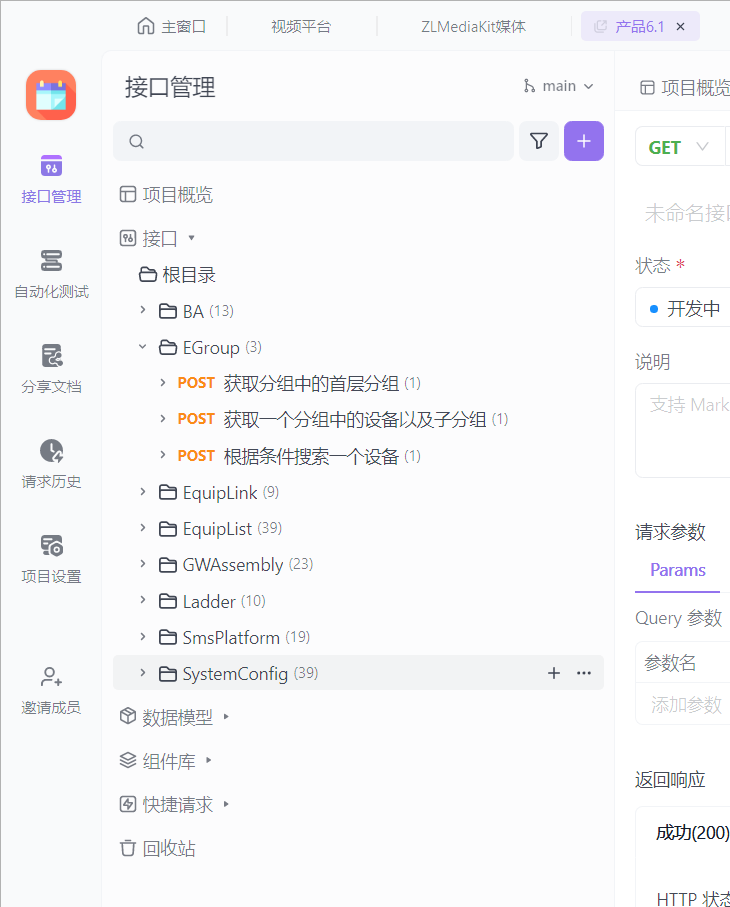
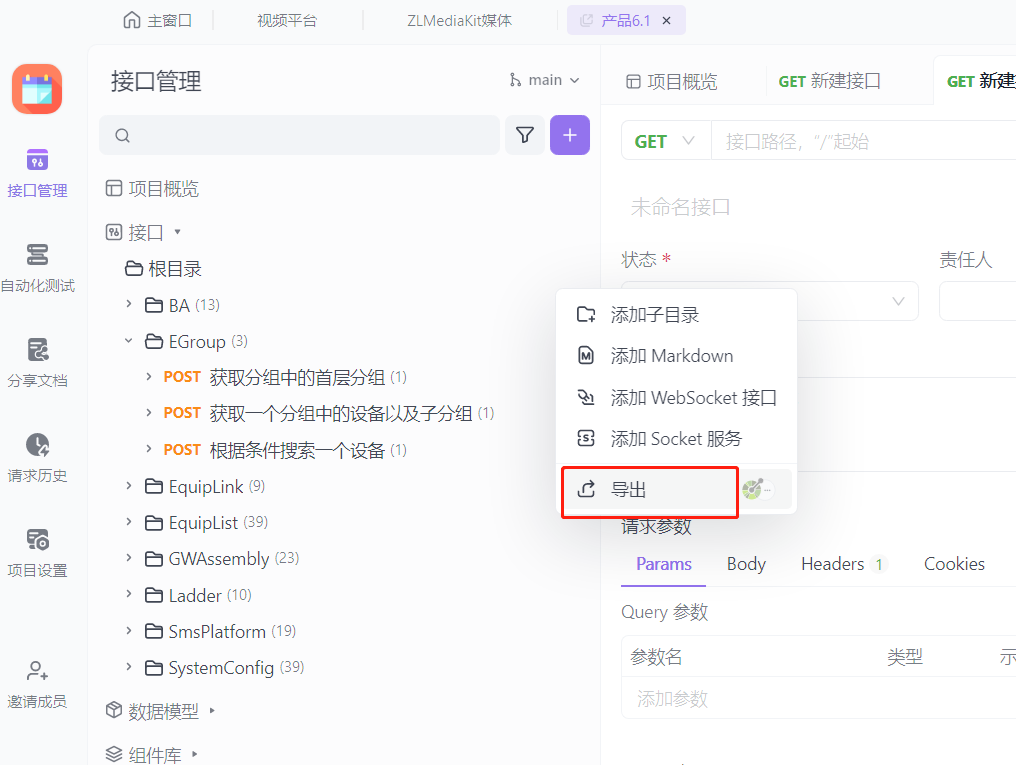
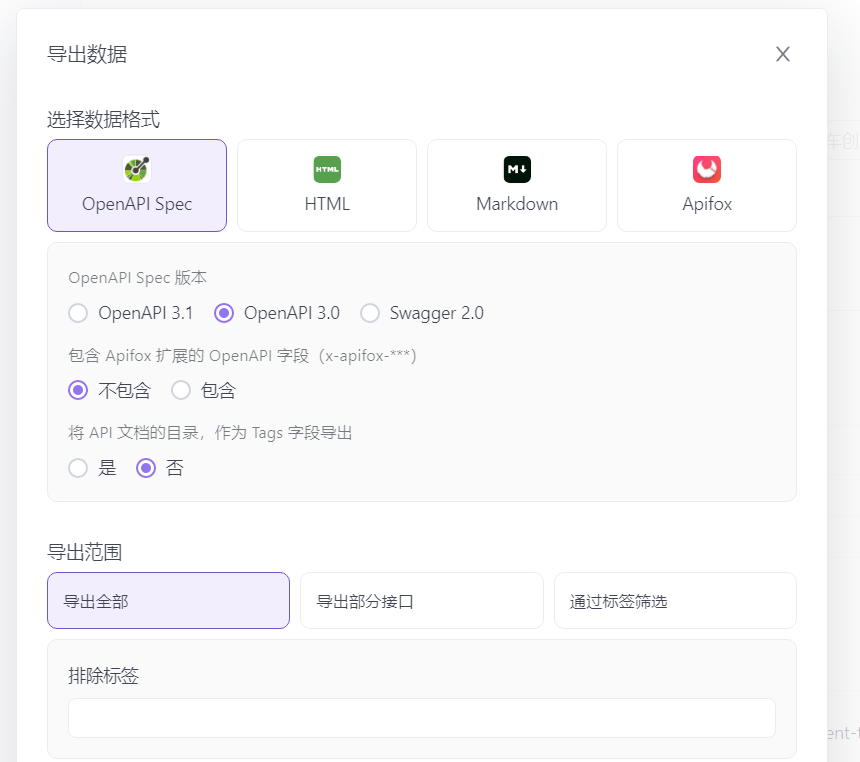
接口分组后,每个组都是一个json文件
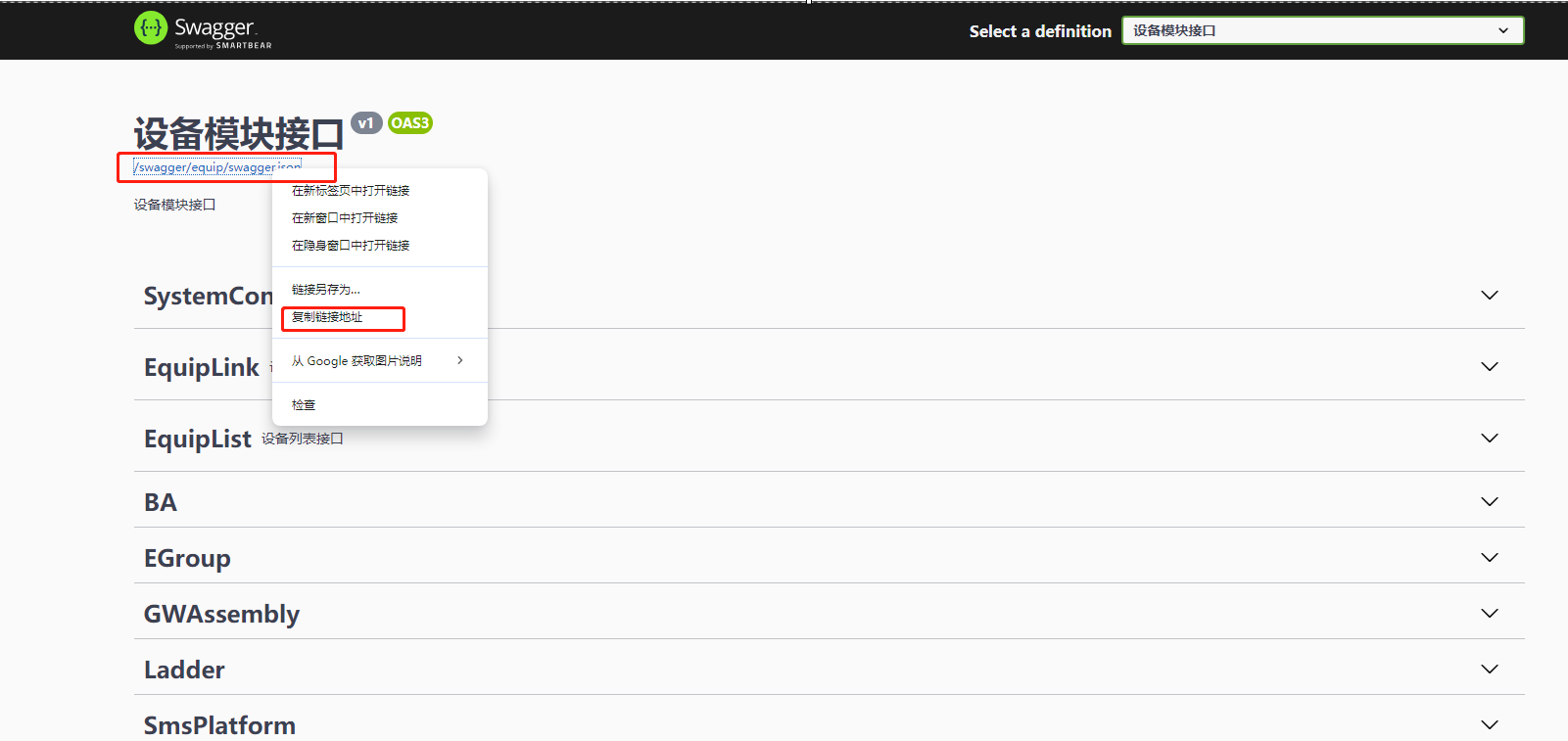
● 使用ApiFox
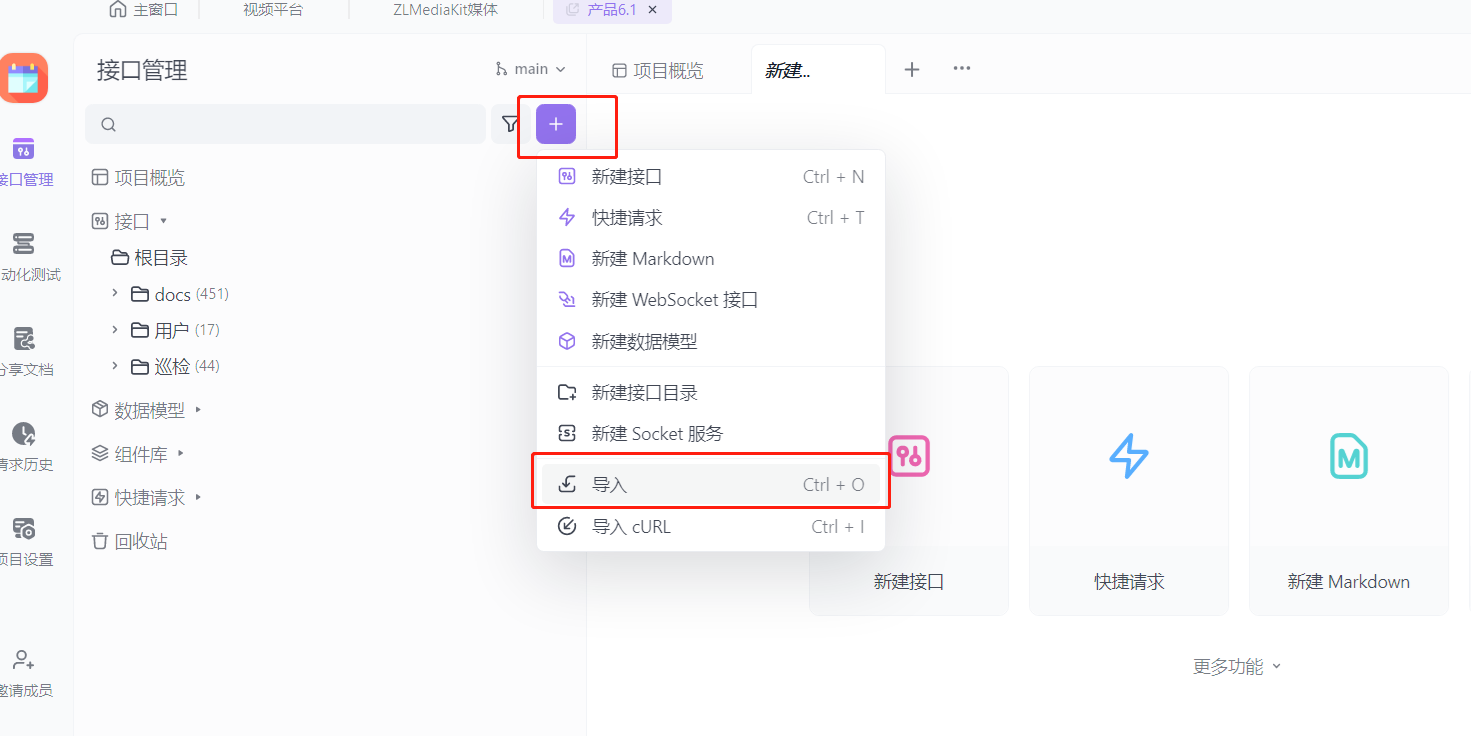
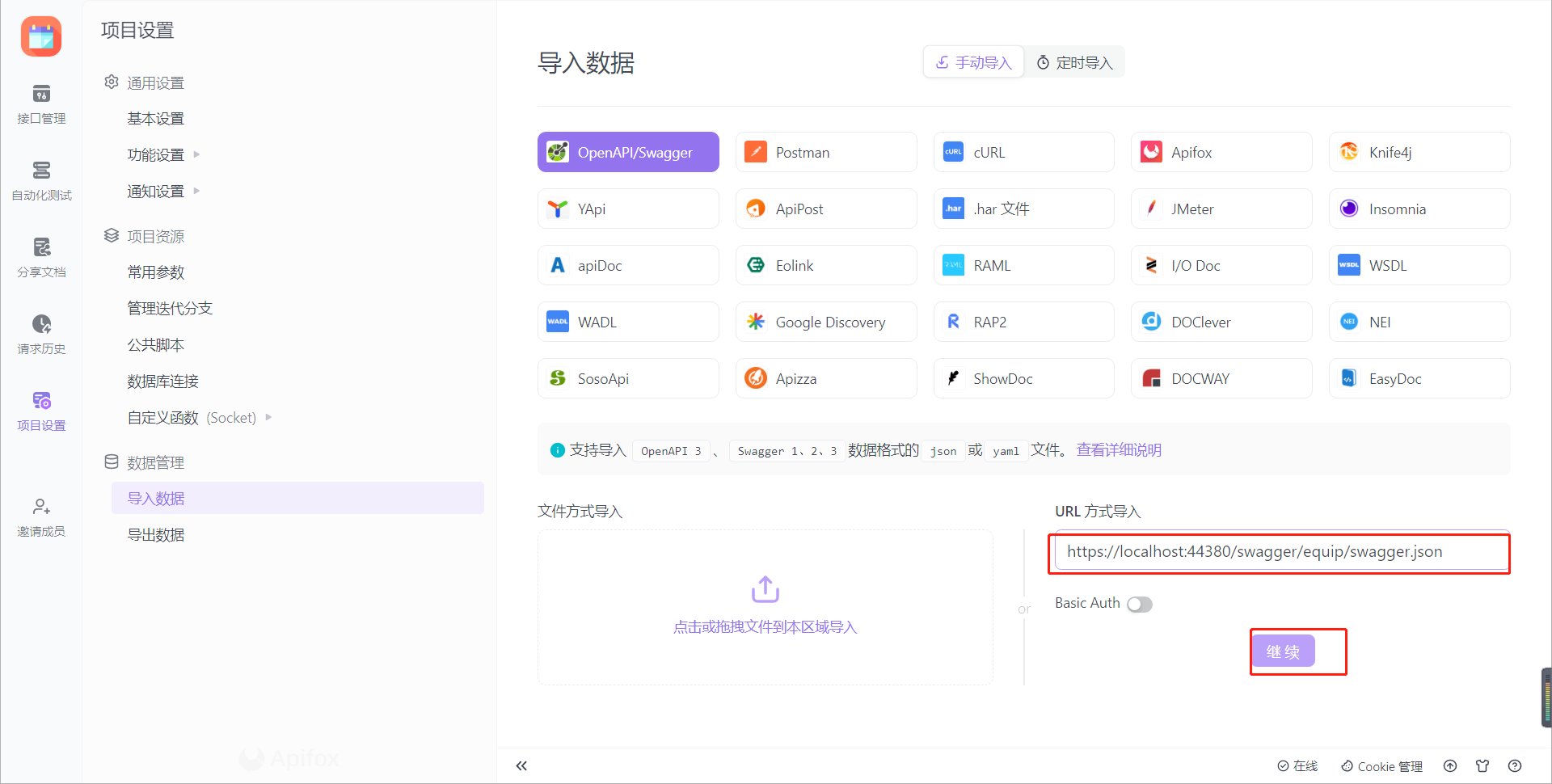
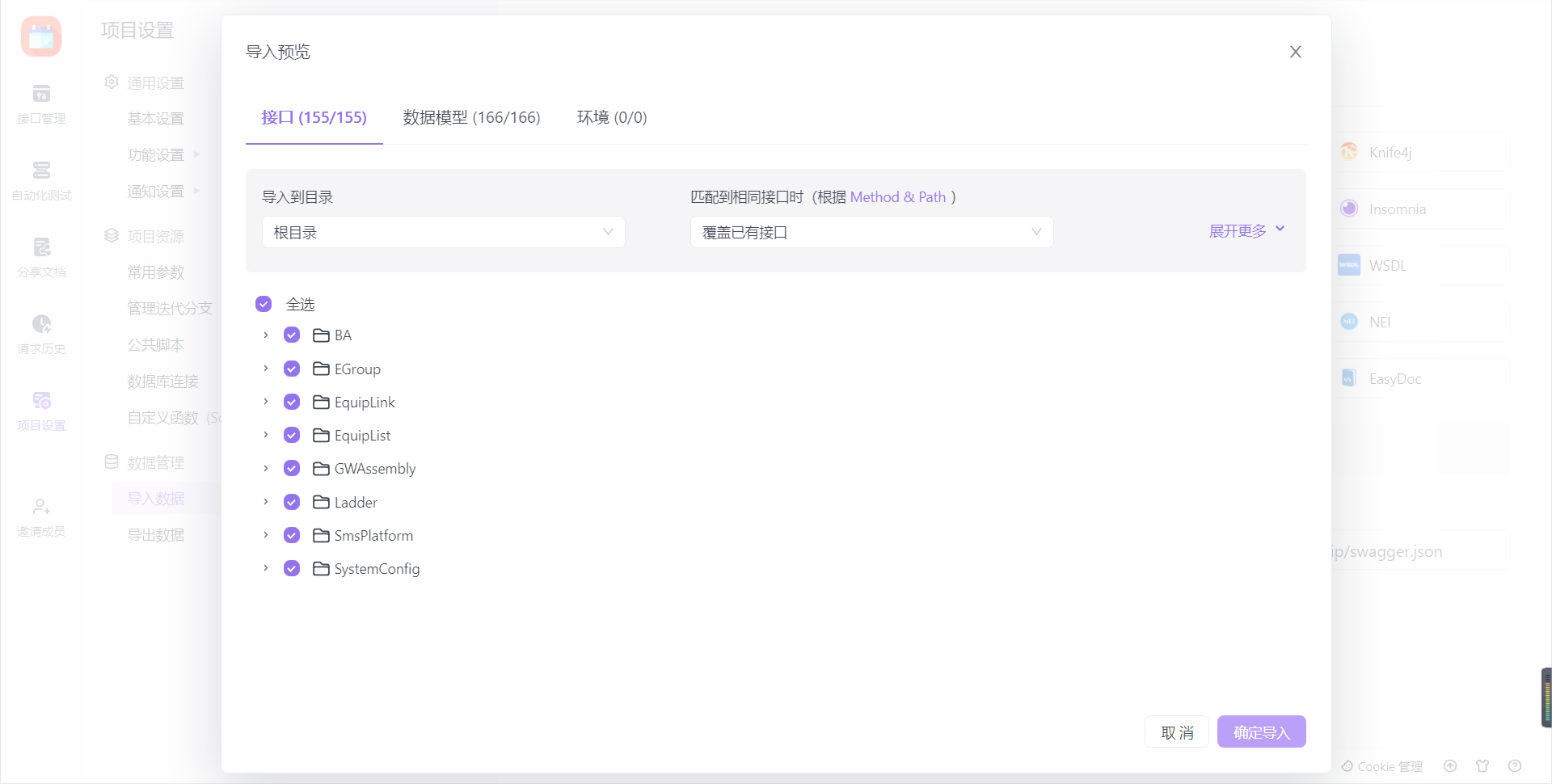
● 导出
# 4.4. 新增分组配置扩展
考虑到新增插件和旧插件改造问题,还有未分组接口显示问题,新增API 接口分组显示配置,具体配置如下
    public enum ApiShowStyle
    {
        /// <summary>
        /// 显示所有未分组的API
        /// </summary>
        All = 1,
        /// <summary>
        /// 显示内置分组API(可能缺少分组下拉,或者多出不属于选定插件API)
        /// </summary>
        Group_Inner = 2,
        /// <summary>
        /// 显示已安装插件分组API(无中文,不一定能匹配上)
        /// 如 Ganweisoft.IoTCenter.Module.UserManage 以.分割取最后UserManage 转小写绑定
        /// </summary>
        Group_Module = 3,
        /// <summary>
        /// 读取配置文件分组(更灵活,但多机环境配置可能不统一)
        /// </summary>
        Group_Config = 4
    }
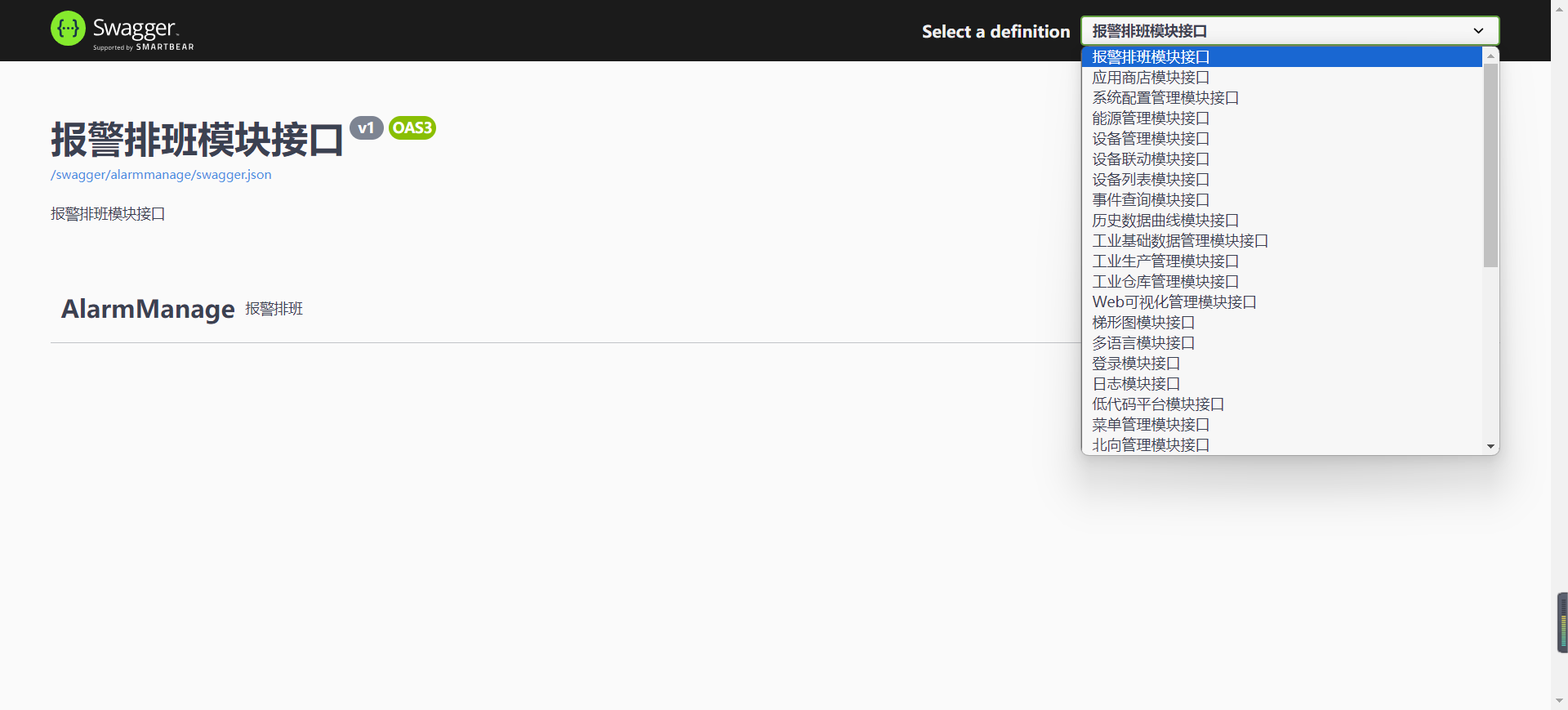
Ganweisoft.IoTCenter.Module.Swagger.json 配置样例
{
  "ShowStyle": 4,
  "GroupInfos": {
    "historydata": "历史数据曲线模块接口"
  }
}
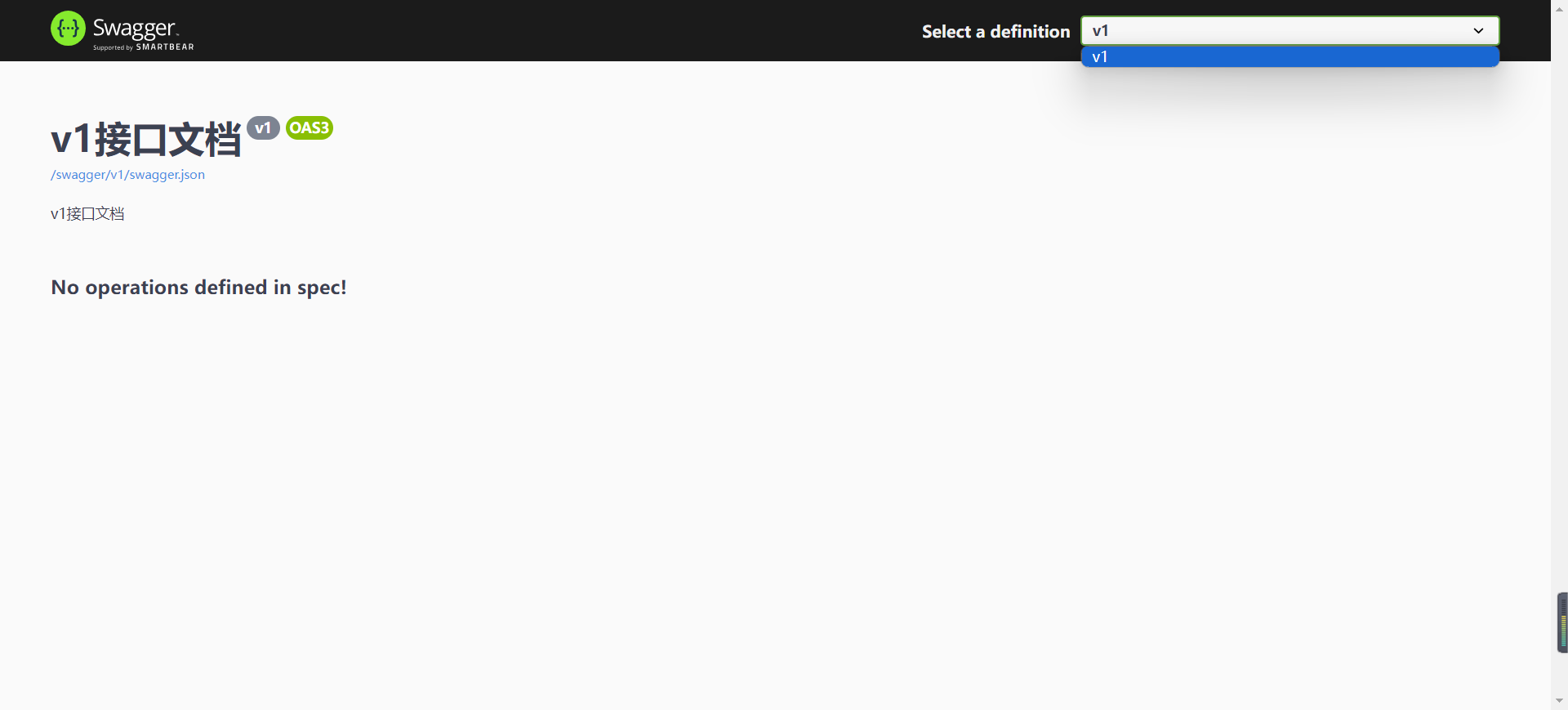
# 4.4.1. 未分组显示
{
  "ShowStyle": 1
}
# 4.4.2. 内置分组
{
  "ShowStyle": 2
}
# 4.4.3. 已安装插件分组(无配置时默认)
{
  "ShowStyle": 3
}
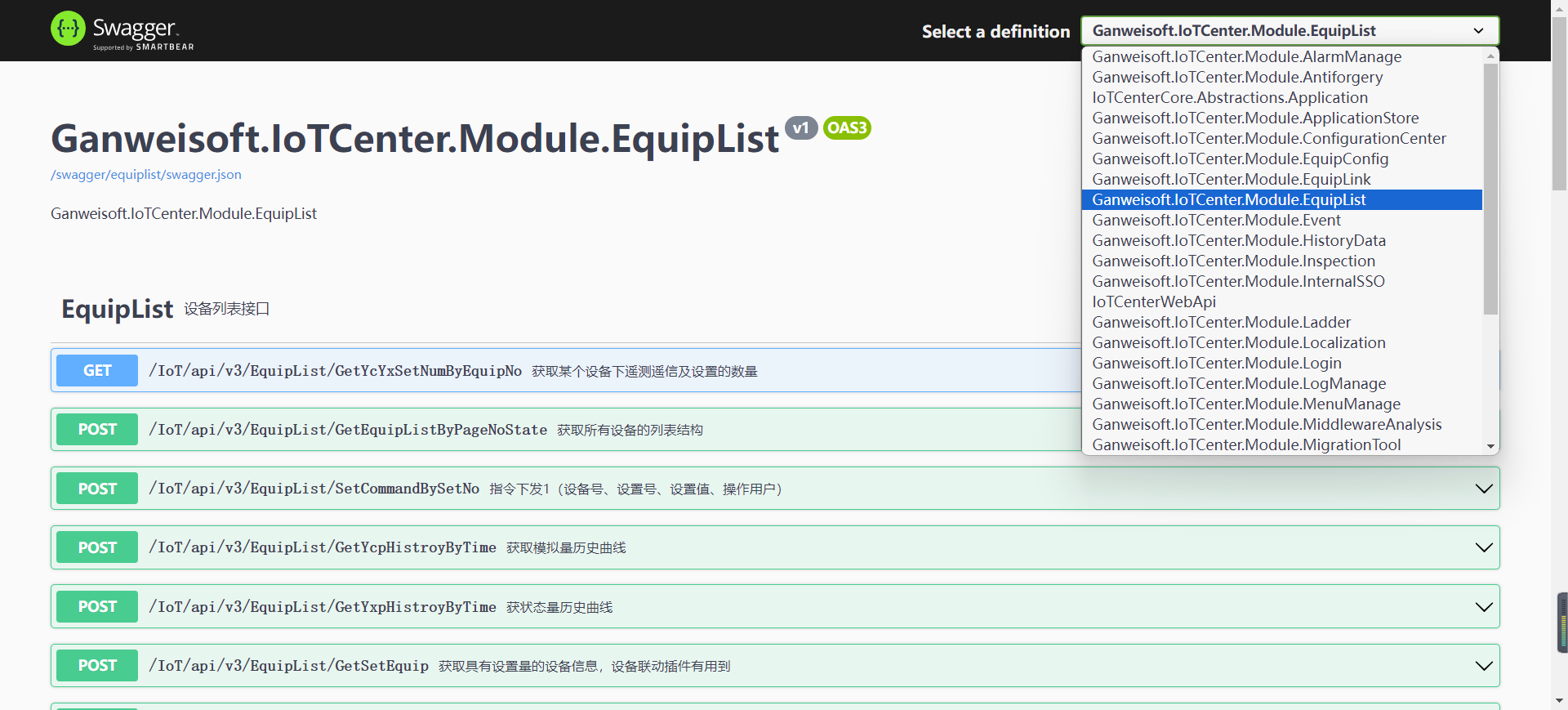
● 支持无接口插件过滤
● 支持下拉文本匹配
{
  "ShowStyle": 3,
  "ALL": {
    "Ganweisoft.IoTCenter.Module.Topology": "gis组态管理",
    "Ganweisoft.IoTCenter.Module.SignalR": "SignalR消息推送组件",
    "Ganweisoft.IoTCenter.Module.Swagger": "Swagger",
    "Ganweisoft.IoTCenter.Module.IoTVisual": "Web可视化",
    "Ganweisoft.IoTCenter.Module.Static": "Web端框架",
    "Ganweisoft.IoTCenter.Module.Event": "事件查询",
    "Ganweisoft.IoTCenter.Module.EIM.HumanManage": "人事管理",
    "Ganweisoft.IoTCenter.Module.LowCodeFormFlow": "低代码平台",
    "Ganweisoft.IoTCenter.Module.IoTGisMap": "全国地图点位聚合",
    "Ganweisoft.IoTCenter.Module.NorthManage": "北向应用管理",
    "Ganweisoft.IoTCenter.Module.InternalSSO": "单点登录",
    "Ganweisoft.IoTCenter.Module.SouthGateWayManage": "南向Hlink网关",
    "Ganweisoft.IoTCenter.Module.FirmwareUpdate": "固件升级",
    "SGCC.IoTCenter.Module.WorkOrder": "国网蒙东工单管理",
    "Ganweisoft.IoTCenter.Module.DeveloperCenter": "多语言开发",
    "Ganweisoft.IoTCenter.Module.Localization": "多语言适配器组件",
    "Ganweisoft.IoTCenter.Module.TimeTask": "定时任务",
    "Ganweisoft.IoTCenter.Module.Record": "定时报表",
    "Ganweisoft.IoTCenter.Module.RealTime": "实时快照",
    "Ganweisoft.IoTCenter.Module.Inspection": "巡检管理",
    "Ganweisoft.IoTCenter.Module.Industry.WMS": "工业仓储管理",
    "Ganweisoft.IoTCenter.Module.Industry.BaseData": "工业基础数据",
    "Ganweisoft.IoTCenter.Module.Industry.MES": "工业生产管理",
    "Ganweisoft.IoTCenter.Module.WorkOrder": "工单管理",
    "Ganweisoft.IoTCenter.Module.ApplicationStore": "应用商店",
    "Ganweisoft.IoTCenter.Module.ReportTemplate": "报表查询管理",
    "Ganweisoft.IoTCenter.Module.AlarmManage": "报警排班",
    "Ganweisoft.IoTCenter.Module.App": "敢为App",
    "Ganweisoft.IoTCenter.Module.HistoryData": "数据分析",
    "Ganweisoft.IoTCenter.Module.MigrationTool": "数据迁移组件",
    "Ganweisoft.IoTCenter.Module.LogManage": "日志预览",
    "Ganweisoft.IoTCenter.Module.DarkEnergyManage": "暗能量",
    "Ganweisoft.IoTCenter.Module.UniformIdentity": "标识系统",
    "Ganweisoft.IoTCenter.Module.ZiChan": "档案管理",
    "Ganweisoft.IoTCenter.Module.Ladder": "梯形图编程",
    "Ganweisoft.IoTCenter.Module.Login": "登录",
    "Ganweisoft.IoTCenter.Module.carbonenergy": "碳能分析",
    "Ganweisoft.IoTCenter.Module.UserManage": "系统权限管理",
    "Ganweisoft.IoTCenter.Module.ConfigurationCenter": "系统配置管理",
    "Ganweisoft.IoTCenter.Module.MqttGateWayManage": "网关组网",
    "Ganweisoft.IoTCenter.Module.EnergyManage": "能效管理",
    "Ganweisoft.IoTCenter.Module.MenuManage": "菜单管理",
    "Ganweisoft.IoTCenter.Module.VideoPatrol": "视频巡更",
    "Ganweisoft.IoTCenter.Module.VideoPlatform": "视频平台",
    "Ganweisoft.IoTCenter.Module.EquipList": "设备列表",
    "Ganweisoft.IoTCenter.Module.EquipConfig": "设备管理",
    "Ganweisoft.IoTCenter.Module.EquipLink": "设备联动",
    "Ganweisoft.IoTCenter.Module.Visitor": "访客管理",
    "Ganweisoft.IoTCenter.Module.Voice": "APP语音控制",
    "Ganweisoft.IoTCenter.Module.Notification": "通知管理",
    "Ganweisoft.IoTCenter.Module.EntranceGuard": "门禁管理",
    "Ganweisoft.IoTCenter.Module.Antiforgery": "防范跨站请求组件",
    "Ganweisoft.IoTCenter.Module.EIM.ProjectManage": "项目管理",
    "Ganweisoft.IoTCenter.Module.PlanManage": "预案管理"
  }
}
● 分组绑定策略
○ 第一优先级以 ganweisoft.iotcenter.module. 开头,去除ganweisoft.iotcenter.module.
○ 第二优先级 包含 iotcenter.module. 去除 iotcenter.module.
○ 第三优先级 以 . 分割,取最后字符串
○ 第四 默认packageId
 // 分组绑定策略
 // 默认全局匹配 Ganweisoft.IoTCenter.Module.Swagger
 var key = name;
 if (key.StartsWith("ganweisoft.iotcenter.module.", StringComparison.OrdinalIgnoreCase))
 {
	 // Ganweisoft.IoTCenter.Module.Swagger =>swagger
	 key = key.Replace("ganweisoft.iotcenter.module.", "", StringComparison.OrdinalIgnoreCase);
 }
 else if (name.IndexOf("iotcenter.module.", StringComparison.OrdinalIgnoreCase) > 0)
 {
	 // SSC.IoTCenter.Module.Swagger => ssc.swagger
	 key = key.Replace("iotcenter.module.", "", StringComparison.OrdinalIgnoreCase);
 }
 else if (key.IndexOf(".") > 0)
 {
	 // Ganweisoft.Module.Swagger => swagger
	 var nameAarry = name.Split(".");
	 key = nameAarry[nameAarry.Length - 1];
 }

 // 字符串转小写
 key = key.ToLower();
# 4.4.4 配置分组
{
  "ShowStyle": 4,
  "GroupInfos": {
    "alarmmanage": "报警排班",
    "antiforgery": "防范跨站请求组件",
    "app": "敢为App",
    "applicationstore": "应用商店",
    "carbonenergy": "碳能分析",
    "configurationcenter": "系统配置管理",
    "darkenergymanage": "暗能量",
    "developercenter": "多语言开发",
    "eim.humanmanage": "人事管理",
    "eim.projectmanage": "项目管理",
    "energymanage": "能效管理",
    "entranceguard": "门禁管理",
    "equipconfig": "设备管理",
    "equiplink": "设备联动",
    "equiplist": "设备列表",
    "event": "事件查询",
    "firmwareupdate": "固件升级",
    "historydata": "数据分析",
    "industry.basedata": "工业基础数据",
    "industry.mes": "工业生产管理",
    "industry.wms": "工业仓储管理",
    "inspection": "巡检管理",
    "internalsso": "单点登录",
    "iotgismap": "全国地图点位聚合",
    "iotvisual": "Web可视化",
    "ladder": "梯形图编程",
    "localization": "多语言适配器组件",
    "login": "登录",
    "logmanage": "日志预览",
    "lowcodeformflow": "低代码平台",
    "menumanage": "菜单管理",
    "migrationtool": "数据迁移组件",
    "mqttgatewaymanage": "网关组网",
    "northmanage": "北向应用管理",
    "notification": "通知管理",
    "planmanage": "预案管理",
    "realtime": "实时快照",
    "record": "定时报表",
    "reporttemplate": "报表查询管理",
    "sgcc.workorder": "国网蒙东工单管理",
    "signalr": "SignalR消息推送组件",
    "southgatewaymanage": "南向Hlink网关",
    "static": "Web端框架",
    "swagger": "Swagger",
    "timetask": "定时任务",
    "topology": "gis组态管理",
    "uniformidentity": "标识系统",
    "usermanage": "系统权限管理",
    "videopatrol": "视频巡更",
    "videoplatform": "视频平台",
    "visitor": "访客管理",
    "workorder": "工单管理",
    "zichan": "档案管理"
  }
}